For licensors & multi-location teams.

Asset Assign works for marquee letter licensors and for event and decor businesses running more than one location.

Every location gets its own account, with its own inventory, reservations and public availability link.

No location can see another location's data, so each team runs its own shop with its own numbers.

See an example availability link

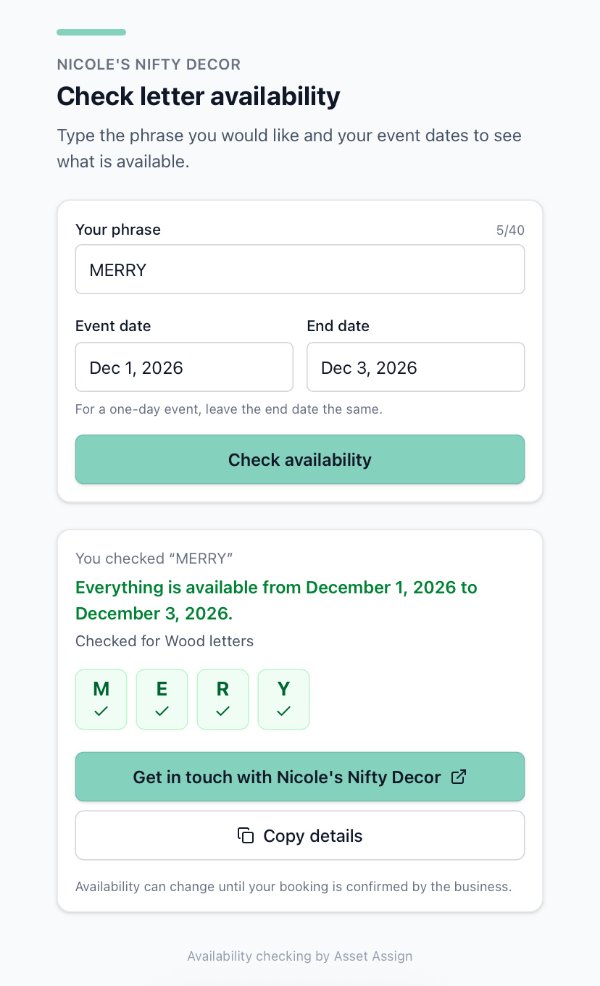
An example public availability link on a phone: the phrase MERRY checked for December 1 to 3, 2026, with every letter available in Wood

Two ways to partner

Partner Code

Nothing to manage

Each location or licensee subscribes on their own with your partner code.

Who pays
Each location or licensee pays for their own account.
What you get
A commission on every paid signup.
What each location gets
A partner discount when they sign up with your code.
Setup
Share your code and each location gets started on their own.
Best for
Licensors who want to recommend Asset Assign and earn a commission without handling billing.

Network Plan

Everyone on one plan

You cover every location on one annual invoice at a partner rate.

Who pays
You do, for every location, on one annual invoice.
What you get
A co-branded Marquee Letter Calculator to help new licensees plan the letters they need.
What each location gets
A full account of its own, covered by you at a partner rate.
Setup
Optional done-for-you setup for each new location: inventory import, styles and availability link.
Best for
Licensors who want every location on the same tool from day one, with Asset Assign included in the new-licensee startup kit.

Want Asset Assign under your own brand? Custom branding is available for committed partners. Let's talk.

Questions licensors ask

Can one location see another location's inventory or reservations?
No. Each location's inventory and reservations are private to that location's account. Other locations can't see them, and neither can the licensor.
Can a licensor see how their locations use Asset Assign?
On the Network Plan, licensors can opt into a monthly usage summary for their network, such as active locations, items tracked and reservations made. It never includes a location's client names or details.
How does Network Plan billing work?
You receive one invoice a year that covers every location at a partner rate, and setup begins once it's paid. Locations added partway through the year are billed for the rest of that year only.
Can we add more locations after we sign up?
Definitely. When a new location joins mid-year, you receive a prorated invoice covering it for the rest of your plan year, and we set the location up once that invoice is paid.
What if a licensee already has its own Asset Assign subscription?
They keep their current plan until it renews, then move onto your Network Plan. You are only billed for that location from their renewal date, so nobody pays twice for the same months.
What happens if a location leaves the network or closes?
Let us know and you'll receive a prorated credit on your next Network Plan invoice, counted from the date you tell us. By default, a location that leaves keeps its data for 30 days, so it can subscribe on its own and pick up right where it left off.
Is there a minimum number of locations for the Network Plan?
We support networks large and small. With as few as two locations, you are eligible for the Network Plan.
How long does it take to get a new location up and running?
A new location can typically be up and running within one business day of sending its setup details. Bringing on several locations at once? We'll agree on a schedule together.
What do you need for done-for-you setup?
The business name, the owner's login email, a link to their website or booking page and a list of every letter, number, symbol and other marquee piece they own, with quantities and styles.
Can licensees switch over from spreadsheets or another system?
Absolutely, and we think they will love the upgrade.
Does Asset Assign work for rentals beyond marquee letters?
Yes. You can create custom categories for every type of rental in your business.
Do locations need training, and who supports them?
Each location is welcome to schedule a setup call, though the app is purposely simple to use. Support is available through help docs, videos, an in-app AI assistant and email with the founder.
Nicole, founder of Asset Assign

Reach out to me directly.

I'm Nicole, the founder of Asset Assign. Tell me how many locations you have and how you run them, and we'll work out which option fits.

nicole@assetassign.app

Fill Out the Partner Form