How to Know If You Have the Letters to Fill a Marquee Order
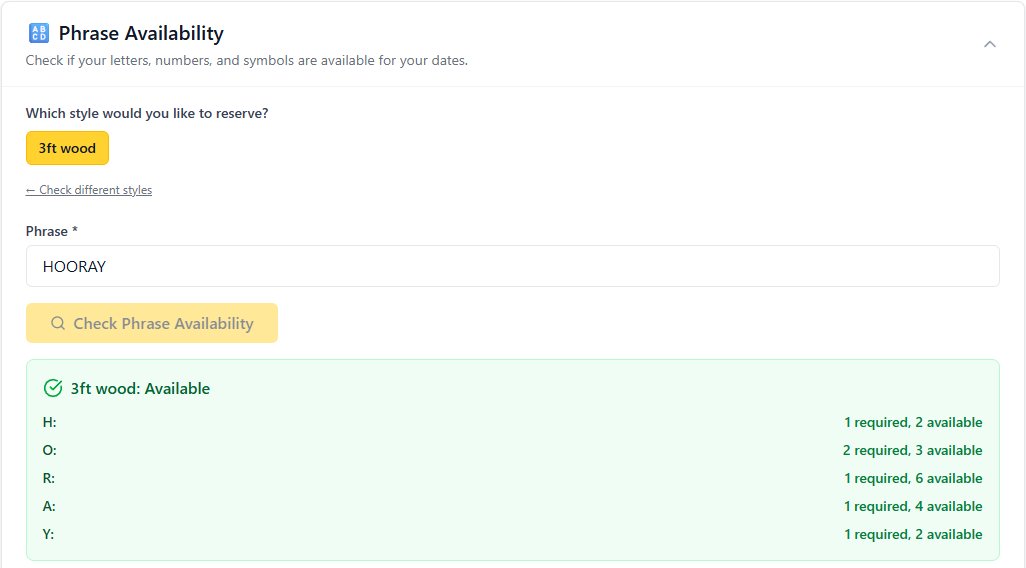
When you use a spreadsheet to track your marquee inventory, you have to check every letter in the requested phrase to see if it's free on that date (after accounting for orders already on the books). Doing that by hand across a spreadsheet is slow and way too easy to get wrong. A phrase availability checker does it instantly; you type the phrase and the date, and it tells you yes or no.
I built Asset Assign because I kept watching letter and decor rental owners lose time, money and sanity to the same problem: they could not tell, at a glance, whether they had the inventory to say yes to the next booking. So, they crossed their fingers they actually had what the client requested.
Why "do I have the letters?" is trickier than it sounds
Say a customer wants "HAPPY BIRTHDAY" on August 22. That phrase needs two Y's, two A's, two P's, an H, an I, an R, a T, a D and a B. Now factor in the "MR AND MRS" set you already rented for a wedding that same weekend, plus the "18" you promised a birthday party. Suddenly you are not checking one order; you are checking three orders against one pool of physical letters. 😵💫
Sometimes... very carefully... owners can answer this type of question with a spreadsheet and a lot of scrolling. It works until it doesn't. Inevitably:
- A letter gets double-booked and it's not realized until the week of the event.
- Orders get turned down because the spreadsheet felt too risky to trust.
- It takes too long to physically count your items before you can reply to a lead.
The real cost is not just the letters. It's also the slow response to your leads, the second-guessing yourself and the bookings that could have been yours when you didn't feel like you could trust the spreadsheet.
What a phrase availability checker actually does
A phrase availability checker flips the question around. Instead of you hunting through rows to reason about inventory, you tell Asset Assign what you want and it does the reasoning.
Type the phrase and choose the date. The checker looks at your full letter inventory (including styles), knows everything already reserved for that date and tells you whether your remaining inventory can spell the phrase. If it can, you say yes with confidence. If it can't, you know immediately, so you can offer a different phrase rather than promising something you can't deliver.
How to check availability the fast way
First, get your inventory into the system once. Enter how many of each letter, number and symbol you own. This is the one-time setup, and it pays for itself the first time you avoid a double-booking.
Second, log every order as it comes in. (Sync in your Google calendar for even easier reservation creation.) Each booking reserves its letters for its date, which keeps the availability math honest.
Third, when a lead asks about a phrase, type it into the checker with their date. You get an instant answer instead of opening a spreadsheet.
Fourth, use the answer to respond fast. The vendor who replies "yes, that date works" first usually gets the job.
Why speed beats spreadsheets
Spreadsheets are static. They show you data, but they don't answer questions. Every time a lead asks about a specific phrase on a specific date, you are the one doing the calculation, and you are doing it under time pressure while juggling everything else in your business.
A purpose-built checker removes you from that loop, full stop.
Set it up once, then just ask
If you rent marquee letters or event decor, the question "do I have what this order needs?" is one you answer dozens of times a month. Answering it by hand is a tax on your time and a risk to your reputation. Answering it with a checker is instant, and it lets you say yes faster, more often and with more confidence.
You can set up your inventory and start checking phrase availability at assetassign.app. Get your letters in once, and let the tool handle the counting from there.
And yes, it'll track all your non-letter rentals (like backdrops, stands, chairs, etc.), too!
Frequently Asked Questions
How do I track marquee letter inventory?
Enter all your letters, numbers and symbols into an inventory list once, then reserve them as requests come through. A tool like Asset Assign keeps a running count of what is in use so you always know what's free on any given date.
Can I check if I have the letters for a specific phrase?
Yes. A phrase availability checker tells you whether your availability inventory can spell the exact phrase and date you've entered. That's the core of what Asset Assign does.
How do I avoid double-booking marquee letters?
Double-bookings happen when two orders quietly need the same physical letters on the same date. Logging every order and checking availability before you confirm prevents it, because the system flags the conflict before you promise the letters.
Do I still need a spreadsheet if I use Asset Assign?
No. Asset Assign replaces the spreadsheet for inventory and availability. Instead of scrolling rows and doing the math yourself, you ask the tool a question and get an answer.
Is Asset Assign only for marquee letters?
Asset Assign is built for marquee letter and event decor rental businesses. If your inventory is made of individual pieces that get reserved by date, the availability approach fits.